Warden
Kalshi: a break, self-exclusion and deactivation differ
Kalshi lists trading breaks, funding caps and voluntary self-exclusion. Its self-exclusion covers the direct website, app and API, but its help page says access through a Futures Commission Merchant is not restricted. It also says you cannot sell open positions during self-exclusion. Review that consequence with platform support before proceeding. Account deactivation has separate requirements: no open positions, no resting orders and a zero balance. Logging back in reactivates the account; existing risk restrictions remain until their scheduled expiry.
Reference: Kalshi: voluntary self-exclusion
Reference: Kalshi: deactivation and reactivation
Reference: Kalshi: responsible trading tools
Polymarket: identify your platform before asking for restrictions
Polymarket’s official guide distinguishes the international website and the US product, with separate accounts and support teams. Contact support@polymarket.com for the international service, or the US in-app chat / support@polymarket.us for the US product. Ask which self-exclusion or account restrictions currently apply to your account, their duration, and what happens to open positions and withdrawals. Do not assume a restriction on one product covers the other, or that uninstalling an app closes an account.
Reference: Polymarket: international and US products
Block the phone routes after reviewing account obligations
Select the installed app in your iPhone rule and check website access separately, including kalshi.com or the Polymarket domain you actually use. Test Safari and any other browser. Warden does not manage trades, payments, API access or other devices. Reduce market notifications and remove home-screen shortcuts if those prompt repeated checks. Keep security alerts and support contact available.
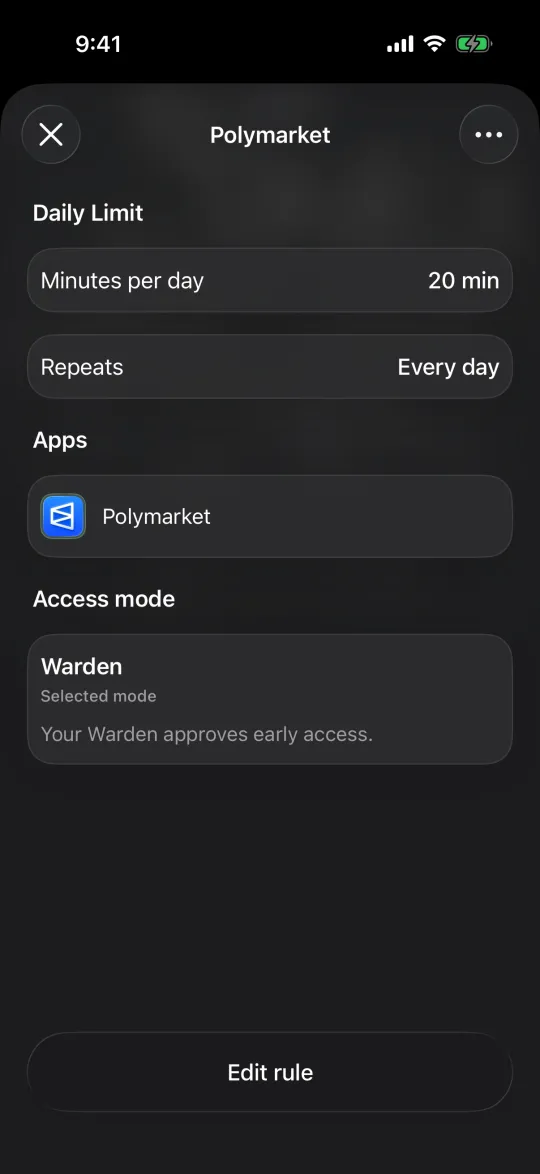
Example: a break from checking election odds
Imagine election news sends you back to the same market every few minutes. First confirm any account obligations and restriction options with the platform. Then remove the shortcut and set an evening phone block for the app and supported website routes. Tell a trusted person what help you want without sharing login or wallet credentials. If you are chasing losses or struggling to stop, seek qualified local support rather than waiting for an app launch. GamCare provides gambling-harm support in Great Britain; support availability depends on where you live.
A plan for overtrading and repeated checks
Reference: GamCare: support in Great Britain