 Warden
Try it
See Warden mode from both phones.
Ask for time on your phone, then answer the request as Sara. Nothing to install.
23:04
Every app is blocked. Tap one.
Your phone
23:04
Tuesday 4 November
23:04
No requests yet.
Sara’s phone
Open a blocked app.
Every app on this phone is blocked. Tap any icon.
Tap an app on your phone
Choose Standard, Warden or Lockdown.
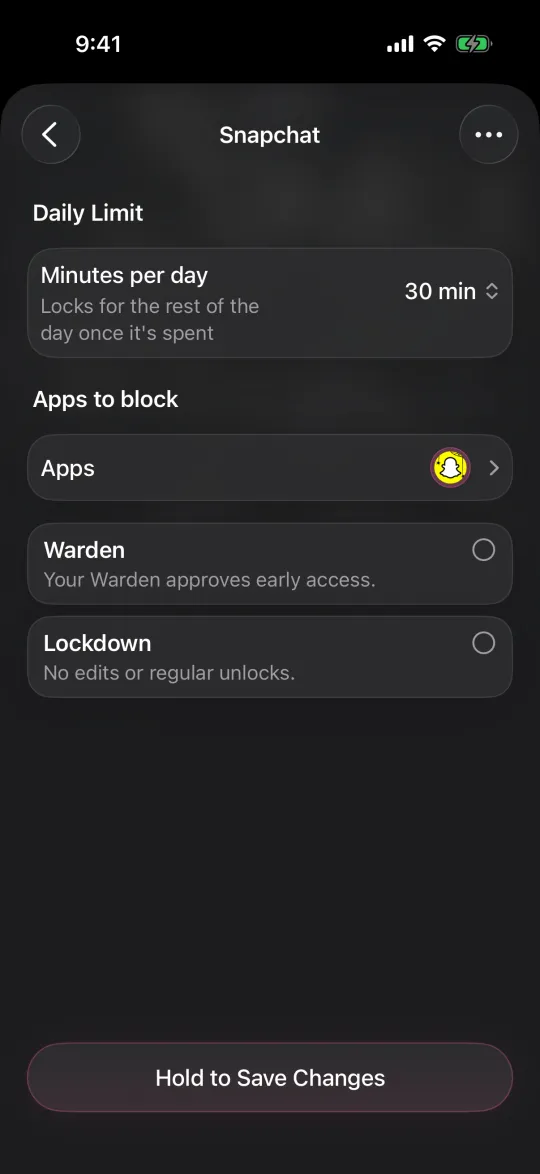
Every rule has an access mode. It decides what happens when you want a blocked app before the rule ends. Leave both options unselected for Standard, or select Warden or Lockdown. You choose per rule, so a bedtime schedule can be strict while a daily limit stays flexible.
- Standard
- You can open a blocked app yourself for 1 to 15 minutes by holding a button, and you can edit the rule at any time. Free.
- Warden
- Early access goes through the person you invited. They approve a request for a set number of minutes or decline it. No answer means the app stays locked. Pro.
- Lockdown
- No early unlocks and no edits while the rule is active. It needs no other person. Pro.
- Emergency access
- Works in every mode, including Lockdown, without approval.